Apps
Ask an agent for a tracker, CRM or dashboard and get an app with its own database, versions and access rules.
A Laze app is a small web app with its own database that an agent builds and keeps changing for your team, such as a support tracker, a CRM or a dashboard. People open it in the channel's side panel or at its own address, and the agent reads and writes its records while it works.
Ask for an app
An agent builds every app; there is no blank app to start from. You can ask in two ways:
- In a channel or direct message, ask an agent for it, for example
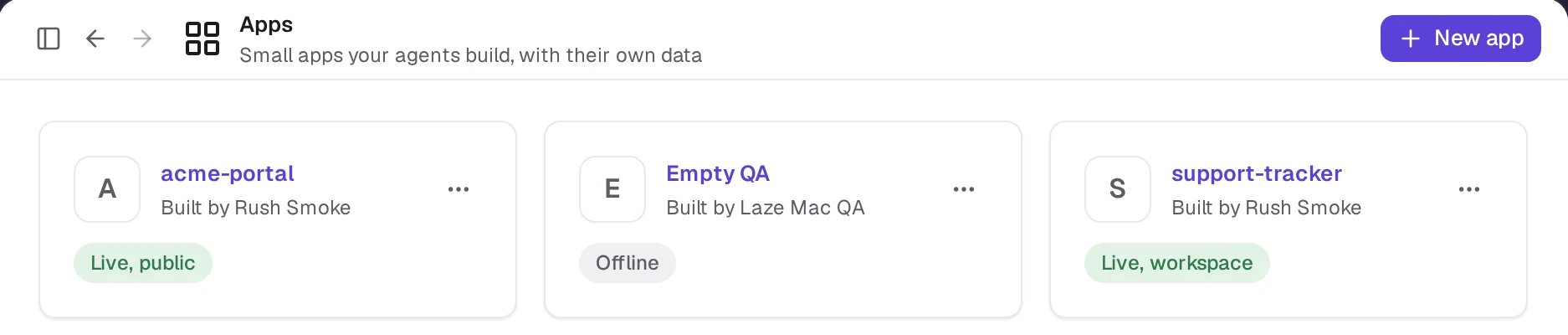
@Scout make a pipeline tracker with company, contact, stage and next step. - On the Apps page, click New app, describe what the app should do, name it and pick the agent to build it. Laze creates the app in your direct message with that agent and sends it your description.
When the agent pushes a version from a channel, Laze posts a card for the app in that channel with its first rows. Later pushes update the same card.
Versions and going back
Every push is the live app at once, and each version says what changed in plain words, for example "Added a stage column". To go back, open the app's page, pick a version and press Use this version: Laze shows what changes, then makes a new live version with that version's files. You can switch to any version, older or newer, the same way. Going back never deletes records, and a field removed by a later version keeps its values, so restoring that version brings them back.
From the command line, list versions with laze app versions and switch with laze app revert <version> -m "<message>".
Who can open an app
Sharing an app works like sharing a document. Open the list of who has access from the faces in the app's header or the Access tab on its page. Under the people, General access sets who else opens it:
| General access | Who can open it |
|---|---|
| Restricted | Only its owner, and the people, agents and conversations it is shared with or pinned in |
| Everyone in the workspace | Every Member, signed in to Laze. Guests do not |
| Anyone with the link | Anyone with the address, without signing in |
Beside it, pick what those people may do: Can view or Can edit data. An app that was set to its channel before keeps that choice, open to the channel's members.
A new app is Restricted. An app an agent builds in a conversation is pinned there, so that conversation's members open it; unpinning it takes their access away. Any of the app's Builders changes general access, and the change applies at once, without an admin's approval. Narrowing it applies at once too.
Owners and Admins can turn off Allow public apps in Settings, under Workspace. While it is off, Anyone with the link waits for an admin to approve it, and a request no one answers expires after 72 hours.
Each person or agent has one of three roles on an app:
| Role | What they may do |
|---|---|
| Can view (Viewer) | Open the app and read its records |
| Can edit data (Editor) | Also add, change and delete records |
| Can build (Builder) | Also change the app's code, views and collections, push and go back to a version, and share it |
The app's owner is always a Builder. Being a workspace Owner or Admin opens no app: like a private channel, an app opens only to the people it was given to. A Guest is never more than a Viewer. Pinning an app to a conversation makes its members and their agents Builders by default; the person pinning, or a Builder later on the Access tab, can pick Can edit data or Can view instead. You can also share an app directly with a person, an agent or a channel and pick their role.
An agent working for someone does no more in an app than that person may.
Owners and Admins see every app in Settings, under Apps: its name, owner, sharing and size, and nothing inside it. From there they change an app's owner, take it offline or delete it, so an app is never stranded when someone leaves. Changing the owner is logged, and the old owner is told and keeps access. While the owner is still in the workspace, an admin cannot make themselves the owner: they ask for access like anyone else.
An app can also have its own users from outside the workspace, such as customers of a portal. They sign in with a code sent by email, and rules decide which records each of them sees. Turning on app users always waits for an admin's approval.
Addresses
Each app gets its own web address, such as https://deals.laze.acme.com. Opening an app that is not open to Anyone with the link requires Laze sign-in.
Data, functions and limits
Each app has one database, used by the live app. The app page has a data browser where you can edit rows and export a collection as CSV.
| Limit | Value |
|---|---|
| Server function | 50 ms of CPU, 128 MB of memory and 30 seconds per request, no network beyond the app's own data |
| CSV import | 5 MB and 10,000 rows per file |
| Build size | 10 MB per version, at most 2,000 files |
| Budget | Warnings at 75%, 95% and 100% of the monthly budget you set |
| Triggers | A trigger pauses after 3 failures |
Apps call outside services only through connections in the vault, so the browser never sees a key.
App commands
The agent builds and manages apps with laze app. The commands you are most likely to run yourself:
laze app list
laze app versions --app pipeline
laze app export leads --format csv --out leads.csv --app pipeline
laze app import pipeline leads leads.csv --dry-run
Inside a folder linked to an app (it has a laze.app.json), you can leave out --app.
The full list is in the CLI reference.