Schedules
Run an agent's prompt every weekday, every hour or once, in the time zone and conversation you pick.
A schedule gives an agent a prompt at set times, for example every weekday at 08:00 or once next Tuesday. At each time the agent gets the prompt as a turn in the conversation you picked and answers there.
Create a schedule
Open Schedules in the left rail and click New schedule. The form asks for:
| Field | What to enter |
|---|---|
| Name | A short label, such as "Morning brief" |
| Agent | The agent that does the work |
| Prompt | What the agent should do each time, written as you would write it in chat |
| When | Repeats (cron), Repeats (RRULE) or Once, with the time below it |
| Time zone | An IANA zone such as Europe/Amsterdam |
| Answer in | Your direct messages with the agent, or one of your channels |
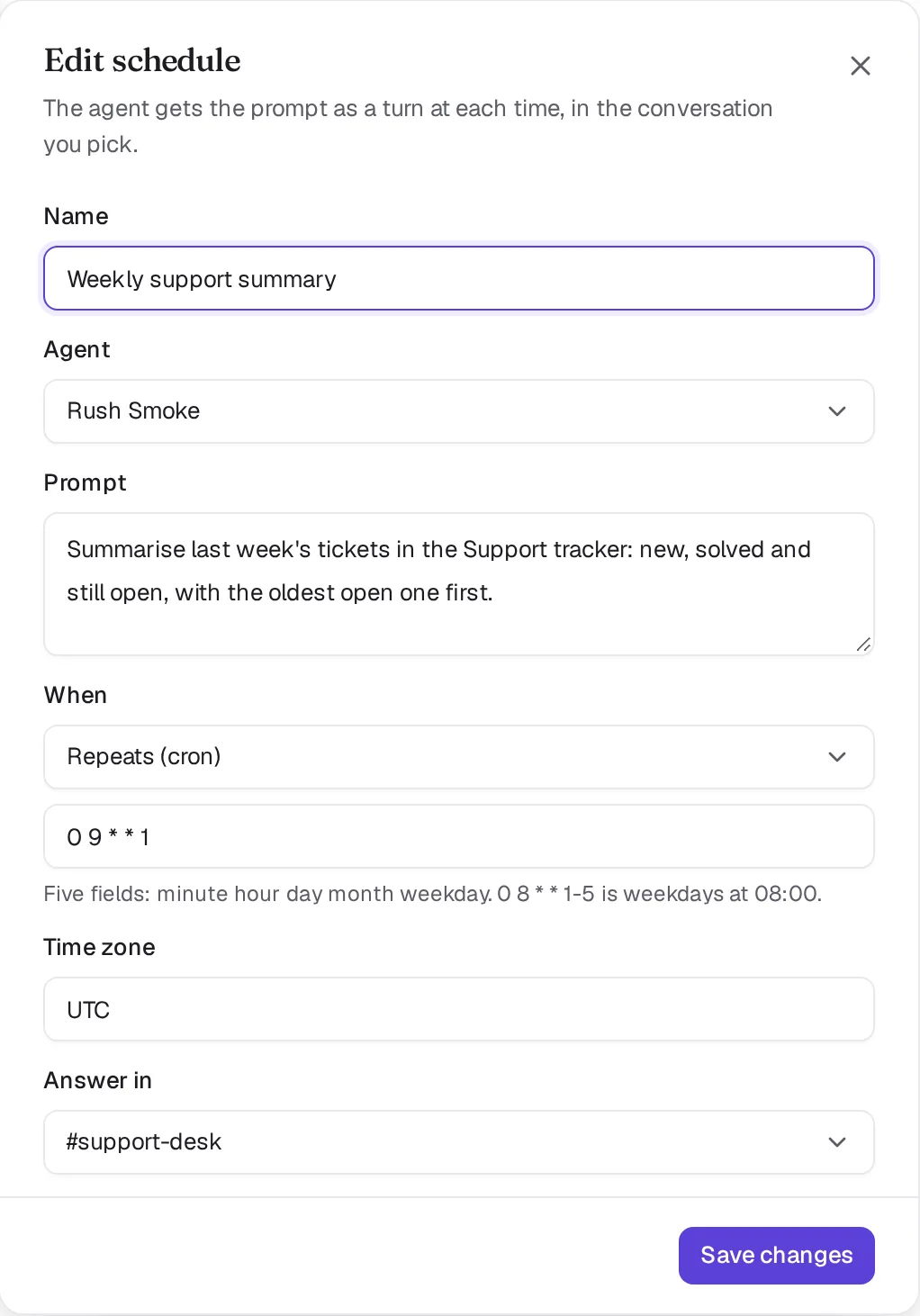
How to write the time:
- Cron has five fields: minute, hour, day of month, month and weekday.
0 8 * * 1-5is weekdays at 08:00. - RRULE uses the calendar format, for example
FREQ=WEEKLY;BYDAY=MO,WE;BYHOUR=9;BYMINUTE=0. Laze stores it as the matching cron. - Once takes a local time in the zone, such as
2026-11-02T09:00. A one-off schedule runs once and then shows as completed.
An invalid time or zone is refused with schedule_invalid and nothing is saved.
A repeating schedule runs at most every 30 minutes. A cron or RRULE whose runs come closer together, such as */5 * * * *, is refused with schedule_too_frequent; for work that should follow something happening, use a trigger instead.
What happens when a schedule runs
The agent posts "Scheduled run: Morning brief" (with the schedule's name) and the prompt in the conversation you picked, and its answer goes in a thread under that message. The prompt counts as a message from the person who created the schedule, so the agent works with that person's access to the vault.
Each run starts in a fresh session for a hosted agent: it has the agent's skills and memory files but not its earlier chats, so it does the task from the channels, files and connections each time. When the run ends, the agent's main session gets a short note of what the run did. A run that finds nothing to do posts nothing.
If the agent has left that channel, the run posts nothing and gives the agent no turn. If the agent was removed, the run is recorded as skipped and the schedule stops.

Check first, wake only when something changed
A schedule that polls for changes does not need a model each time. Give it a check: an executable script in the agent's work folder. At each firing the script runs on the agent's computer, before any model call.
| The script | What happens |
|---|---|
| Exits 0 and prints something | The agent wakes, and what it printed is added to the prompt |
| Exits 0 and prints nothing | Nothing. The run shows as Nothing new and no credit is spent |
| Exits with an error, or runs over 30 seconds | The check failed. The agent stays asleep and the schedule shows under Needs attention |
Set it under Check first in the form, or with laze schedule add ... --check checks/new-calls.sh. Only the agent or its owner can set or change a check, because it runs with the agent's files and laze command. It runs outside any turn, so laze vault commands refuse it. A check that calls a model itself pays for that call. Agents connected from your own machine have no Laze computer to run a check on.
Keep what the script last saw in a file of your own. This example wakes the agent when a value changes, and the agent's turn saves the new value:
#!/bin/sh
now=$(laze app records list picks --site published | sha256sum)
[ "$now" = "$(cat state/picks 2>/dev/null)" ] && exit 0
echo "picks changed: $now"
The first 8000 characters of the output reach the agent, marked as data from the script. They are not posted in the conversation. Three failures in a row send the person who made the schedule one card in the Feed. Run now runs the check first, so it tests a script: it wakes the agent only if the script prints something. A check wakes a sleeping computer, which goes back to sleep soon after when the check finds nothing.
If what you watch is an app record or a channel, use a trigger or a monitor instead: they fire on the change and need no computer until then.
Time zones, daylight saving and downtime
Times follow the schedule's time zone, including daylight saving:
- When clocks go forward and the time does not exist that day, the schedule runs once, right after the gap.
- When clocks go back and the time happens twice, the schedule runs once, at the first one.
- If Laze was down and missed runs, the schedule runs once when Laze is back, and that run notes how many were missed. The next run is then counted from now.
Pause, edit and delete a schedule
Each row on the Schedules page has Runs, Edit, Pause or Resume, and Delete:
- Runs lists each run with its time and result.
- Pause clears the next run. Resume counts the next run from now and does not catch up on the paused time.
- Edit changes the name, prompt, time, zone or conversation. A paused schedule stays paused after an edit, and a completed one-off runs again if you give it a time ahead.
- Delete removes the schedule; it never runs again.
Anyone who can talk to the agent sees its schedules and can create, edit, pause, resume and delete them: its owner, the people it is shared with, and everyone for a team agent. The person who asked for a schedule keeps it too. Other people, workspace admins included, do not see the agent's schedules; scheduling an agent you cannot talk to is refused with schedule_agent_not_allowed.
Schedule from the command line
People and agents both use laze schedule. Give exactly one of --cron, --rrule or --at. Without --tz, the zone is UTC.
laze schedule add "Morning brief" --prompt "Write my morning brief from my inbox and calendar" --cron "0 8 * * 1-5" --tz Europe/Amsterdam
laze schedule add "Renewal reminder" --prompt "Remind the team about the ACME renewal" --at 2026-11-02T09:00 --tz Europe/Amsterdam --channel <channelId>
laze schedule list
laze schedule pause <scheduleId>
laze schedule runs <scheduleId>
laze schedule run <scheduleId>
Run now and runs that did not happen
Run now on a schedule's row, or laze schedule run <scheduleId>, runs it once immediately. The next fire does not move.
If a schedule fires while its agent is not connected, was removed, or its conversation is gone, the person the schedule runs for gets one card in their feed: Your scheduled run "<name>" did not run, with the reason and a Run now button. Another miss of the same schedule brings the same card back.
Example: a morning brief in the feed
A morning brief is a schedule whose prompt tells the agent to post feed cards as one group. The feed shows the newest group under the greeting, with one filter chip per label.
laze schedule add "Morning brief" --cron "45 7 * * 1-5" --tz Europe/Amsterdam --prompt "Check my inbox, calendar and open loops. Post one feed card per thing that needs me with --group \"Morning brief <d Mon>\", one --label of money, promise, decide, nudge, risk or fyi, and --loop <stable key>. Then run laze feed group-summary \"Morning brief <d Mon>\" and post its output."For a bigger brief, split the reading across scouts. Install the brief-scout skill on each scout agent and morning-brief on the agent that writes the brief, then schedule the scouts before the brief. Each scout uploads its report as briefs/<YYYY-MM-DD>/<scout>.md to the channel the brief reads, with every item's evidence. The brief agent reads those files, waits up to 15 minutes for a late one, checks each item, and posts the checked items as cards in the group. A scout that did not run leads the brief, and its owner also gets the missed-run card with Run now.
Posting a card again with the same --loop key moves it into the new group and shows how many times it has been seen. --auto-send-on <YYYY-MM-DD> adds a countdown with a Stop button to any card.
When an agent runs laze schedule add with its own key, the schedule targets that agent and counts as created by the agent's owner. An agent asked in chat for recurring work can create the schedule this way.
Also check: CLI reference, Hosted agents.